TL;DR here's the repo, the name of the project is Vessel.
Hey Everyone!
It's been a while since I last wrote a blog. I had an idea or two, but they lacked substance. But now, with my recent project Vessel, I've finally found something substantial to write about.
So this blog is just me explaining how I came up with the architecture and why I made certain choices for this project, their justification, trade-offs, challenges I faced, future changes which I am actively working on, etc. Kind of my experience log which I had while building the MVP/first iteration of this project.
So let's get started.
The Idea
To set the context, my project acts as an audio streaming library where a user would:
- Upload their audio files
- The backend stores them
- Process audio files so they can be used for adaptive streaming (Adaptive Bitrate Streaming, to be specific)
- Users are provided with an interface where they can stream their uploaded audio files from anywhere (the quality of streaming would change according to their network condition)
The 4th point mentioned above is technically what Adaptive Bitrate Streaming is.
If you've ever streamed audio on platforms like Spotify, YouTube, Netflix, etc., you'd notice that if your network speed becomes slower, the platform automatically switches to a lower quality of audio/video.
It is possible because the platform doesn't download the whole video/audio at once. Instead, it downloads it in chunks and, as you progress through them, it automatically downloads the next chunks and changes the quality of chunks based on your network condition.
Most browsers on mobile and Safari support this natively through the HLS (HTTP Live Streaming) protocol.
So just to make it clear, this blog is not focusing on the frontend part as most of the code is just me one-shotting using coding agents, and I used the Hls.js library for that purpose.
So the blog is mainly focusing on the backend architecture and how the platform reacts to user interactions.
High-Level Requirements
Now, to achieve these high-level objectives, the platform is supposed to perform the following tasks:
- Let users upload their audio files
- Process the user's uploaded file into different bitrates and store them
- Store the user's original audio files and their different versions
- Maintain the user's library and all metadata
- Provide them with an interface to stream their uploaded file
After brainstorming for a while and doing a few Google searches and chats with Claude, I came up with the following procedure to achieve the aforementioned goals:
- Users would authenticate themselves on the platform so that I can maintain a per-user library (for now I have kept it private, in future iterations I might include public/private uploads but that would introduce a new set of challenges which I will mention later in the blog)
- Once the user is done uploading their file, the backend should trigger an asynchronous worker to process the uploaded file
- That worker should download, process, and upload the files back and notify the backend whether it succeeded or failed in the process
- Once the audio is processed, users should be able to see that their file is ready to be streamed
Once I was ready with a high-level plan, I started working on the implementation.
Thus, it was time for me to finalize the tech stack.
NextJS + Elysia Powering the Main Web App
This is the user-facing part of the project.
Initially, I wanted a simple React frontend with a separate Express backend, but realizing the goal of this project was not to make another CRUD app, I chose NextJS as it easily integrates the frontend and backend while Vercel makes deployment damn easy (credit has to be given where it's due).
The only issue I have with NextJS is writing API routes. It's certainly not a delightful experience, and that's why I chose to integrate Elysia as the backend.
With this combination, I am now able to easily use server components (which I certainly didn't use) and have a type-safe way to write APIs, the best of both worlds.
Cloudflare R2 as Object Storage Service
Of course, my project involves uploading and managing files, and for that purpose I needed some object storage service.
Cloudflare R2 was a no-brainer for me due to their generous free tier and zero egress fee, i.e. making the streaming part essentially free as I have used a public R2 bucket in this project (yeah there is no sort of DRM protection whatsoever).
Azure Container Instance (ACI) as the Worker
PS: This part of the ACI setup was based on the older architecture. I have now migrated the worker to Azure Container Apps Jobs (ACA Jobs), which only required a few changes in how the payload (audio file information) and certain environment variables are passed from the trigger to the worker. The rest of the architecture remains exactly the same. The system can now process 5 audio files concurrently, and this limit can be increased easily.
Now this dude is responsible for doing the actual heavy-lifting for this project, that is downloading and converting audio into various bitrates.
Once the user is done uploading their file, the backend has to trigger this guy and ask it to do the following things:
- Download the uploaded file from the public bucket
- Encode its chunks (yes chunks, not the whole file) into these bitrates: 64kbps, 128kbps, 192kbps, 256kbps (higher the bitrate, better the quality), and for this purpose it uses ffmpeg. I have set the chunk length to 6 seconds.
- Once chunks are ready, it has to create two playlist (
.m3u8) files.
One playlist file would contain the information about chunks and this is what it looks like (different for each bitrate):
#EXTM3U
#EXT-X-VERSION:6
#EXT-X-TARGETDURATION:6
#EXT-X-MEDIA-SEQUENCE:0
#EXTINF:6.013967,
segment_000.ts
#EXTINF:5.990756,
segment_001.ts
#EXTINF:6.013967,
segment_002.ts
#EXTINF:0.166544,
segment_003.ts
#EXT-X-ENDLIST
Then there would be a master playlist file which would contain the information about all the other playlists, and this is what it looks like:
#EXTM3U
#EXT-X-VERSION:3

#EXT-X-STREAM-INF:BANDWIDTH=64000,CODECS="mp4a.40.2"
64k/playlist.m3u8
#EXT-X-STREAM-INF:BANDWIDTH=128000,CODECS="mp4a.40.2"
128k/playlist.m3u8
#EXT-X-STREAM-INF:BANDWIDTH=192000,CODECS="mp4a.40.2"
192k/playlist.m3u8
#EXT-X-STREAM-INF:BANDWIDTH=256000,CODECS="mp4a.40.2"
256k/playlist.m3u8
These playlist files are generated using ffprobe.
- Once it is done, it'd upload these chunks and playlist files back to the bucket and eventually they form this type of directory structure in the bucket:
userid/
└── audio-uuid/
    ├── <bitrate>/
    │   ├── segment_xx.ts
    │   └── playlist.m3u8
    ├── audio-uuid.extension
    └── master.m3u8
So when the user starts streaming
master.m3u8
    │
    ├────► 64k/playlist.m3u8
    │           ├── segment_000.ts
    │           ├── segment_001.ts
    │           └── ...
    │
    ├────► 128k/playlist.m3u8
    │
    ├────► 192k/playlist.m3u8
    │
    └────► 256k/playlist.m3u8
Browser selects bitrate dynamicallybased on current network speed.
I have used NodeJS's builtin spawn and childProcess to start and manage ffmpeg/ffprobe processes, and the whole worker is containerised inside a NodeJS 22 Alpine image which has ffmpeg and ffprobe binaries installed in it.
Thw whole flow can be seen like this:
Input Audio
     │
     ▼
┌───────────────┐
│   ffprobe     │
│ inspect audio │
└──────┬────────┘
       │ metadata
       ▼
┌────────────────────┐
│      ffmpeg        │
│ segment + transcode│
└──────┬─────────────┘
       │
       ├──────────────► 64kbps segments
       ├──────────────► 128kbps segments
       ├──────────────► 192kbps segments
       └──────────────► 256kbps segments
                           │
                           ▼
                 Generate playlists
                 (.m3u8 manifests)
                           │
                           ▼
                      Upload to R2
I pushed this image to GitHub Container Registry because it was free, unlike Azure Container Registry which is hogging up the most amount of my Azure credits.
Once done, I pushed this image and created an Azure Container Instance, but triggering these instances is the most troublesome part and I kind of regret choosing ACI, which I will explain later in the blog. But for now let's mark it as done.
PostgreSQL: The Source of Truth
I don't have to elaborate much here.
Postgres is the final source of truth which contains all the metadata and user info including the public URL of audios, and the main concerned table here is the upload table.
It has the following columns/attributes:
id: the primary key (UUID)key: the exact path where the original audio is uploaded (e.g.uploads/1EmsrtjrGMQ9iR2HFp2Fg0Nxim2NGwPc/1a1c22c8-8894-402e-9566-80f71a02fdc5/1a1c22c8-8894-402e-9566-80f71a02fdc5.mp3)filename: the name which frontend would see in the user's library (extracted at the time of upload)content_type: the MIME type which is going to be eitheraudio/mpegoraudio/wavas the platform currently supports mp3 and wav filessize: size of the audio file in bytespublic_url: obviously, for now it's kind of redundant but in future if I switch or add new buckets this would help me stream as each bucket would have its own public domainjob_secret_hash: hash of a nanoid, this column adds an extra layer of defenseuser_id: there's a user table in my DB so this column is just a foreign key that refers to the user from that table, allowing the platform to separate audio files per usercreated_at: duh!!!
Cronjob the Cleaner
It periodically scans uploads table for jobs that are either already failed or stuck in processing beyond a safe time limit (default 8 hours), then treats those as stale data, deletes their related files from Cloudflare R2 (both source file and generated HLS folder), and finally removes those rows from PostgreSQL so the system does not keep ghost files or dead records forever; the core logic is “find stale/failed uploads in batches -> derive all storage keys for each upload -> delete storage objects -> delete DB row -> log summary/errors,” with optional DRY_RUN mode to simulate everything without actually deleting anything.
The Wildcard
Alright so these were the main pieces of the architecture.
However, there were some challenges which I faced that introduced a new guy here, which was an Azure Function.
Since ACI does not support invoking an instance through HTTP, I had to introduce a trigger function hosted on Azure Functions that does nothing but spin up an instance.
Also in ACI, once environment variables are configured they cannot be modified, so this function actually helps me dynamically inject environment variables each time an instance is invoked.
These environment variables contain:
- credentials to R2
- information about the audio file (URL, metadata, etc.)
User Flow
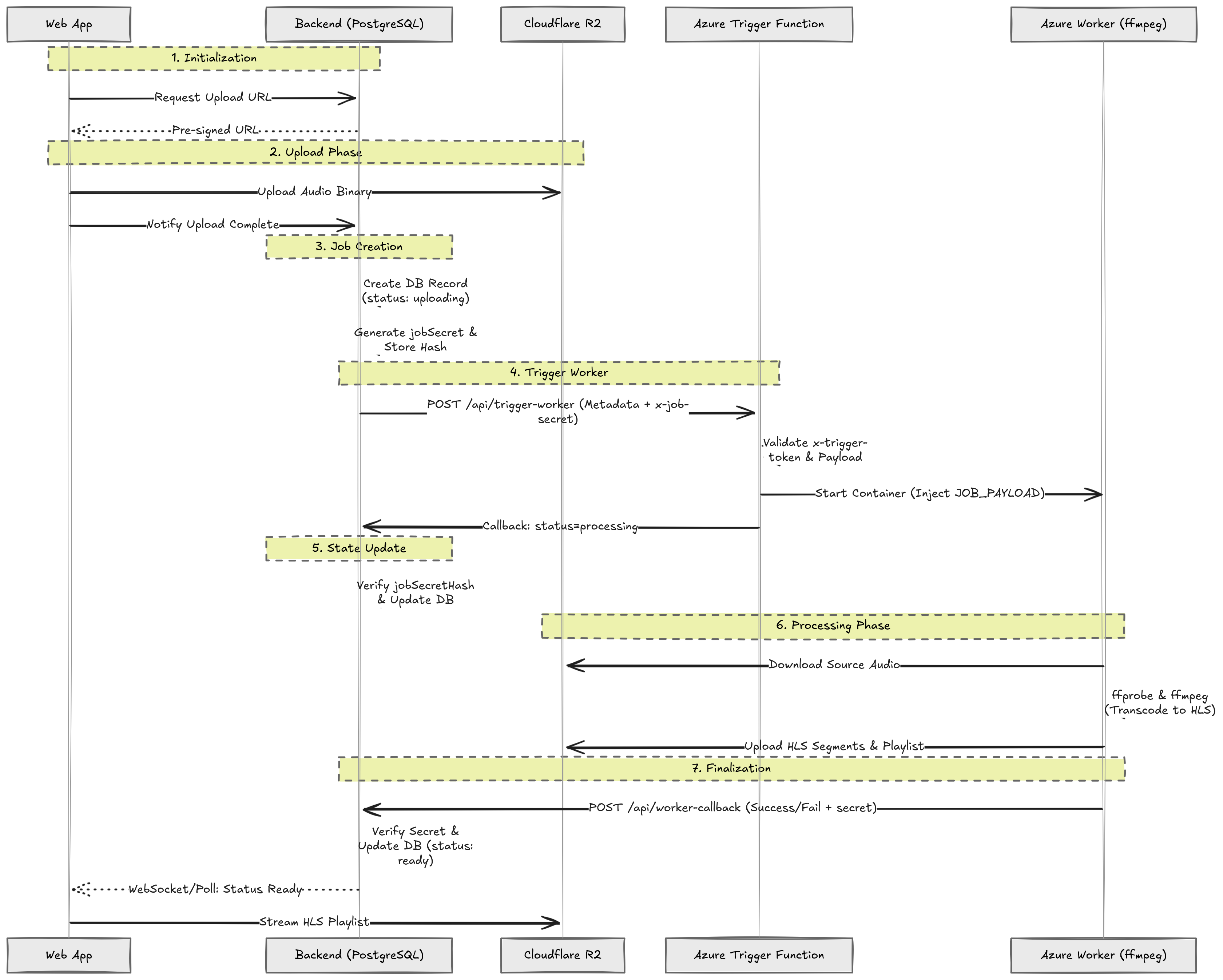
Now once all pieces were in place, as a user I was subjected to the following flow:
- I open the platform and sign in to my account.
- I go to the upload page and choose an audio file from my device.
- The app asks the backend for permission to upload my file safely.
- The backend gives the app a secure upload link (Pre-signed PUT URL) for Cloudflare R2 storage. (I don't want to waste double bandwidth as the backend itself is not doing any sort of processing on the audio file.)
- My browser uploads the audio file directly to R2 using that URL.
- After upload finishes, my app tells the backend: "File is uploaded."
- The backend creates a database record for my file in PostgreSQL and marks it as
uploading. - The backend now creates a one-time secret for this exact job (
jobSecret). - For safety, the backend stores only a hashed version of that secret (
jobSecretHash) in DB, not the plain text. - The backend calls the Azure Trigger Function and sends:
- my upload details (
id, file key, filename, userId) - a service secret (
x-trigger-token) - and the one-time per-job secret (
x-job-secret)
- The Trigger Function checks whether the service secret is correct. If the secret is wrong, it stops immediately.
- It checks that the payload is valid and complete. If the payload is bad, it rejects the request.
- It checks whether a worker container is already running for another active run. If yes, it rejects duplicate triggering.
- If all checks pass, it prepares the worker input (
JOB_PAYLOAD) and includes the job secret there too. - Then it starts the Azure Container Instance worker.
- As soon as worker startup is accepted, Trigger Function calls backend internal callback (
/api/internal/trigger-callback) and says: "processing started." - Backend verifies that callback using:
- trigger secret
- per-job secret
- and payload validation
- Backend hashes the incoming
x-job-secretand matches it withjobSecretHashin DB. If they match, backend marks my job asprocessing. - The worker now starts real processing:
- reads source audio
- inspects it (
ffprobe) - transcodes and segments it into HLS (
ffmpeg)
- Worker uploads generated HLS files (playlist + segments) back to R2.
- Worker then calls backend internal worker callback (
/api/internal/worker-callback) with:
- worker secret (
x-worker-secret) - same per-job secret (
x-job-secret) - status (
readyorfailed) - output metadata
- Backend again validates all security checks:
- worker secret must match
- hashed job secret must match DB
- payload shape must be valid
- If callback is valid:
- on success, backend marks my job
readyand saves output info - on error, backend marks my job
failed
- On the frontend, I keep seeing progress/state updates from backend.
- Once status becomes
ready, I can play my audio stream as HLS from R2.
Why This Is Secure
- Random users cannot trigger internal pipeline calls because secrets are required.
- Even if someone guesses an upload ID, they still cannot update it without the correct one-time
jobSecret. - Backend stores only secret hash in DB, so plain secret is not stored permanently.
- Every callback is validated before any DB update is allowed.
What Happens on Failure
- If the trigger step fails after upload, backend marks the job failed and can clean stale source files (ghost-file prevention).
- If worker fails processing, backend gets failed callback and marks the record failed.
- So I always see a final clear state: either
readyorfailed.
Challenges
Now that I dumped the whole flow here, I must address the challenges, shortcomings, and future plans with this project.
- Too many direct dependencies
Current Dependency Chain

Backend
   │
   ▼
Trigger Function
   │
   ▼
ACI Worker
   │
   ▼
Worker Callback
   │
   ▼
Backend DB Update

Any failed hop can desync job state.- No durable job control: Job progress depends on HTTP calls/callbacks. Network timeouts can leave DB and real worker state out of sync.
- Scaling is hard: Current flow is built around manually starting ACI. Not ideal for many uploads at once. As I mentioned earlier, I regret choosing ACI because it does not have any sort of orchestration. So if you try uploading two files back-to-back, the later one is most likely to fail as the ACI might still be busy processing the previous file, requiring you to re-upload it after some time.
- Lack of a good user interface: currently the platform is very basic. I need to make it better by letting users efficiently browse their and others' audio files (currently users see only their own files).
Doing so would introduce a new set of challenges:
- efficient searching
- better handling of private/public uploads
- probably schema changes in DB as well
Future Plan
There are several improvements which I want to make, but my exact future plans are as follows:
- Introduce a queue and retry mechanism to ensure better job handling instead of solely relying on HTTP callbacks; something like this
               Future Architecture

            ┌──────────────────┐
            │     Backend      │
            └────────┬─────────┘
                     │ enqueue job
                     ▼
              ┌─────────────┐
              │    Queue    │
              └──────┬──────┘
                     │ consume
                     ▼
         ┌────────────────────────┐
         │ Container Apps Jobs    │
         │ Auto-scaled Workers    │
         └──────────┬─────────────┘
                    │
                    ▼
             HLS Processing
                    │
                    ▼
R2- Add a proper orchestration layer over ACI or migrate to Azure Container Apps Jobs as they have it builtin
- Make the UI more intuitive and add proper searching over the user's library once it starts getting bigger. This part actually looks intriguing, but I am currently unaware of how exactly I'd implement it, thus it's at the bottom of my list.
Final Thoughts
Alright so I believe that's enough description and I kind of wrote a glorified README for this project lol. I might update this blog later as I make changes.
Until then, have a good one :)